'%3e%3cpath%20d='M121%202C187.274%202%20241%2055.7258%20241%20122C241%20180.73%20198.809%20229.603%20143.084%20239.97V149.692H143.085V163.781C143.085%20154.334%20148.851%20150.652%20156.073%20148.427C157.161%20148.168%20158.234%20147.871%20159.291%20147.538C159.307%20147.534%20159.324%20147.529%20159.341%20147.525H159.33C177.858%20141.661%20191.376%20124.531%20191.841%20104.175H191.854V103.18C191.854%20103.15%20191.854%20103.121%20191.854%20103.092V91.1699C191.854%2091.1466%20191.854%2091.1229%20191.854%2091.0996V89.3594C191.854%2079.5641%20185.445%2073.4144%20175.598%2073.4141C165.75%2073.4142%20159.341%2079.5639%20159.341%2089.3594V102.883C159.32%20108.986%20154.367%20113.928%20148.259%20113.929C145.402%20113.929%20143.086%20111.613%20143.086%20108.757V74.9141H143.084V62.6289C143.084%2049.5367%20134.54%2041.3174%20121.409%2041.3174C108.279%2041.3177%2099.7344%2049.537%2099.7344%2062.6289V141.307C99.7139%20144.145%2097.4069%20146.441%2094.5635%20146.441C88.4427%20146.441%2083.4801%20141.479%2083.4795%20135.358V136.688H83.4785V121.872C83.4785%20112.076%2077.0695%20105.927%2067.2217%20105.927C57.3743%20105.927%2050.9658%20112.077%2050.9658%20121.872V136.688H50.9795C51.4442%20157.043%2064.9624%20174.173%2083.4902%20180.038H83.4785C83.4972%20180.043%2083.5165%20180.048%2083.5352%20180.053C84.5873%20180.385%2085.6563%20180.68%2086.7393%20180.938C93.9371%20183.154%2099.6897%20186.814%2099.7344%20196.184V240.121C43.6041%20230.083%201%20181.017%201%20122C1%2055.7258%2054.7258%202%20121%202ZM67.2227%20113.929C72.0107%20113.929%2075.8924%20117.811%2075.8926%20122.599C75.8924%20127.387%2072.0106%20131.268%2067.2227%20131.269C62.4347%20131.268%2058.5529%20127.387%2058.5527%20122.599C58.5529%20117.811%2062.4347%20113.929%2067.2227%20113.929ZM175.598%2081.416C180.386%2081.4164%20184.267%2085.298%20184.268%2090.0859C184.267%2094.8739%20180.386%2098.7555%20175.598%2098.7559C170.81%2098.7557%20166.928%2094.8741%20166.928%2090.0859C166.928%2085.2979%20170.81%2081.4161%20175.598%2081.416ZM121.409%2051.0713C127.394%2051.0714%20132.246%2055.9231%20132.246%2061.9082C132.246%2067.8935%20127.394%2072.746%20121.409%2072.7461C115.424%2072.7458%20110.571%2067.8934%20110.571%2061.9082C110.572%2055.9232%20115.424%2051.0716%20121.409%2051.0713Z'%20fill='currentColor'/%3e%3c/g%3e%3cdefs%3e%3cclipPath%20id='clip0_475_9215'%3e%3cpath%20d='M0.5%20120.5C0.5%2054.2258%2054.2258%200.5%20120.5%200.5V0.5C186.774%200.5%20240.5%2054.2258%20240.5%20120.5V120.5C240.5%20186.774%20186.774%20240.5%20120.5%20240.5V240.5C54.2258%20240.5%200.5%20186.774%200.5%20120.5V120.5Z'%20fill='white'/%3e%3c/clipPath%3e%3c/defs%3e%3c/svg%3e)
The versioned filesystem for AI agents
Connect your agents to the files they need, unlock parallel agent swarms, and track their changes automatically.
npm install @mesadev/sdkimport { Mesa, repo } from "@mesadev/sdk";
const mesa = new Mesa({ privateKey: process.env.MESA_PRIVATE_KEY });
// Create versioned directory in Mesa
await mesa.repos.create({ name: "foobar" });
// Create isolated, in-process mount
const fs = await mesa.fs({
layout: { "/workspace": repo("foobar", { mode: "rw" }) },
authors: [{ name: "Mesa Agent", email: "agent@example.com" }],
}).mount();
// Read, write, and execute unix commands within the 'fs' object
await fs.writeFile("/workspace/src/README.md", "hello world");
const result = await fs.bash({ cwd: "/workspace" }).exec("cat src/README.md");
console.log(result.stdout);Build powerful features with just a few lines of code.
Human-in-the-loop reviews & approvals
Pause any agent at any step. Build approval queues, change requests, and policy gates—then resume from the exact same workspace state.
Parallel agent swarms
Fork a workspace, run dozens of parallel agents on isolated branches, pick the best result.
Checkpoints & rollbacks
Snapshot the entire filesystem at every step. Roll back to any past state in a single API call.
Shared memories & skills
Version skills, memories, and learned context in a filesystem your agent fleet can read and write.
Any file, any format
Version code, spreadsheets, images, and anything else.
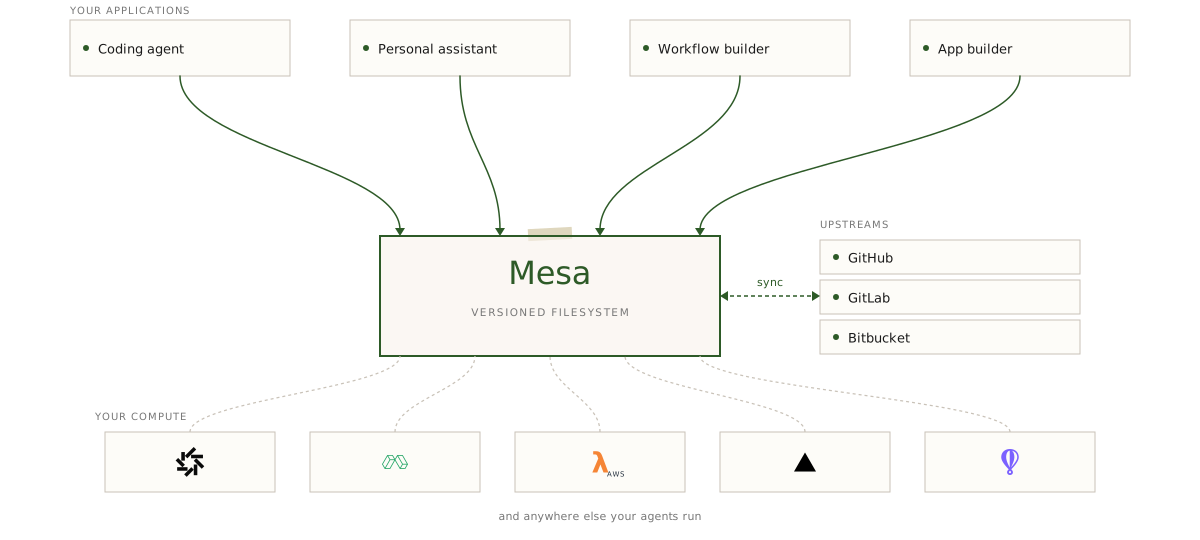
Your compute is ephemeral. Your files shouldn’t be.
Solve your hardest use cases with the most advanced filesystem in the world.

Manage any document type, version the changes, use human-in-the-loop reviews.
Manage any document type, version the changes, use human-in-the-loop reviews.
You shouldn't have to choose between version control and a filesystem.
Mesa | Git Hosts | Cloud Filesystems | |
|---|---|---|---|
| Branching & merging | |||
| Version history | |||
| Diffs across any two states | |||
| Instant forks & clones (ms) | |||
| Concurrent writers | |||
| POSIX filesystem mount | |||
| Sub-50ms read/write API | |||
| Sparse materialization of files | |||
| Large file support | |||
| Strong-consistency durability | |||
| Fine-grained ACLs per branch / path |
Secure and built for enterprise workloads.
Talk to our team about deploying Mesa in your environment.
Deploy Mesa inside your own infrastructure.
Run Mesa in your own AWS, GCP, or Azure account. We operate the control plane; your data and audit trail never leave your perimeter.
SOC 2 Type II
Independently audited. AES-256 at rest, TLS 1.3 in transit, full access logging.
Fine-grained Access
Short-lived access tokens scoped to the repositories and permissions each agent needs.
Simple, usage-based pricing.
Two metered dimensions, a generous free tier, and no minimums. Estimate your bill with the pricing calculator
Free
Start building in minutes
- 50 GB storage
- 1,000 repositories
- 200 GB / mo egress
- Unlimited virtual filesystem reads
Scale
Scale beyond the free tier
- $0.20 / GB / mo storage
- $0.11 / GB egress (Git + REST API)
- Free tier included on every account
- Priority support
Enterprise
For teams running Mesa at scale
- Volume & committed-use discounts
- Self-hosted (BYOC) deployments
- SOC 2 Type II & dedicated support
- Custom SLAs and procurement
Frequently asked questions
Does my agent really need versioning?
Branch-based versioning is a huge unlock for agent applications. If you want an agent to do work that is then reviewed for approval by humans, or if you want to run parallel agent swarms that modify the same files, or if you want have an audit trail for your agents, or support checkpoints to rollback mistakes then you probably want versioning.
Why can't I just use GitHub or GitLab?
You can! You'll find that you run into rate limits, repo limits, and ergonomics that make you want to tear your hair out, though. Git providers give you branching, history, and diffs but no real filesystem — you can't mount them, random-access large files, or get sub-50ms reads. Mesa gives you all of Git's versioning semantics plus a fast, mountable filesystem in one platform.
How is this different from S3 and S3 Files?
If you just need a durable filesystem and you're on AWS then S3 Files is a great solution. S3 Files only works on AWS services, however, so if you anticipate your agent running in multiple environments you'll need a cross-cloud solution. Similarly, S3 Files doesn't support branch-based versioning or diffs which means if you want agent swarms to edit documents in parallel you'll need to implement some level of locking or just let the agents clobber over each other. Mesa gives you built-in primitives to scale to as many agents as you need without worrying about locking.
Is MesaFS POSIX compatible?
Yes. MesaFS is 100% POSIX compatible so agents and sandboxes can use familiar Unix tools and standard filesystem APIs. Mesa handles persistence, sync, and version history transparently underneath.
My data lives in X, can I sync it to Mesa?
Mesa has built-in support for syncing data between Git upstreams like GitHub, GitLab, and others. We aim to support non-Git upstreams like S3, Google Drive, and others in the future but for now it's easy to write your own sync scripts using our APIs and MesaFS.
How does egress metering work?
You can read data from Mesa in 3 ways: Git, our REST API's content endpoint, and our virtual filesystem (MesaFS) which can be mounted in your application or on the OS itself. We meter per GB of egress for Git and our Content API but all reads through MesaFS are free and do not count towards your egress limit. MesaFS is the primary way to interact with repositories in Mesa.
Does Mesa handle large files like datasets, models, and media?
Yes. Mesa supports large files with random access, no per-file size limits, and built-in deduplication. Store code, datasets, models, and media in the same workspace.
How fast is Mesa?
Sub-50ms reads and writes through MesaFS, p95 reads under 100ms through our API, and millisecond-level forks and branches. Spinning up an isolated workspace for a parallel agent run is essentially free.
Okay but is Mesa fast enough?
When building agent applications, performance generally comes down to time-to-first-token (TTFT) and read/write latency. Mesa's TTFT is lower than Git by an order of magnitude because you avoid the cost of cloning an entire repo. Mesa materializes files on demandso your agent can start working immediately. Mesa also maintains a local cache and intelligently prefetches data based on access patterns. For warm reads, Mesa's p95 latency is on the order of nanoseconds and for cold reads it's under 100ms.
Give your agents the files they need.
Join the waitlist for early access to Mesa.